


As a learner driver in the UK, preparing for your driving test can often feel overwhelming. With multiple routes, different types of junctions, and tricky manoeuvres to master, it’s crucial to have a reliable tool that can help guide you through the process. This is where the Test Routes Driver App comes in. Designed to make your preparation more efficient, this uk driving test app offers everything you need to confidently tackle your driving test. In this guide, we’ll walk you through the steps of using the app and how it can help you pass your test with flying colours.
What is the Test Routes Driver App?
The Test Routes Driver App is a mobile application that provides learner drivers with an easy and convenient way to familiarise themselves with the official driving test routes in the UK. With detailed maps and step-by-step instructions, the app simulates real-life test routes, so you can practise with confidence.
Key Features of the App
User-Friendly Interface: The app is designed to be easy to navigate, making it suitable for all levels of learners.
Real Test Routes: The app includes actual test routes, allowing you to practise the exact routes used during your driving test.
Free Downloads: You can download driving test routes for free and access them anytime you need.
This app is an essential tool for anyone looking to prepare efficiently for their UK driving test.
How to Download and Install the Test Routes Driver App
Step 1 – Download the App
To begin using the app, you’ll first need to download it. The Test Routes Driver App is available for both iOS and Android devices, making it easy to access from your smartphone. Simply head to the App Store or Google Play Store, search for the app, and hit “Download.” The process is quick and hassle-free.
Step 2 – Setting Up the App
Once downloaded, open the app to begin setting it up. You’ll be prompted to create an account or sign in. If you’re new to the app, setting up an account is quick and straightforward. After logging in, you can customise the app to fit your needs, including selecting which test areas and routes you wish to practise.
Step 3 – Navigating the App
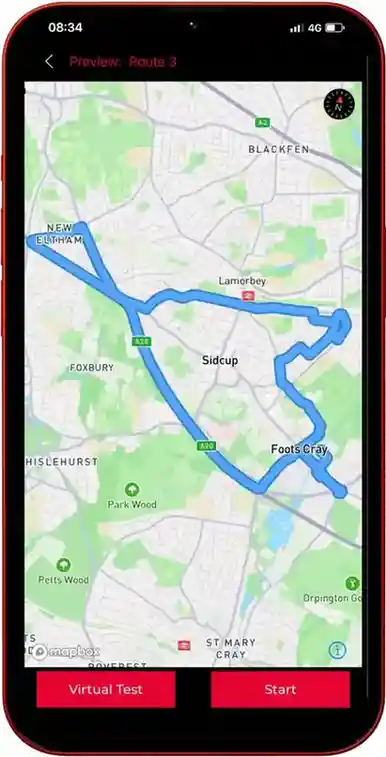
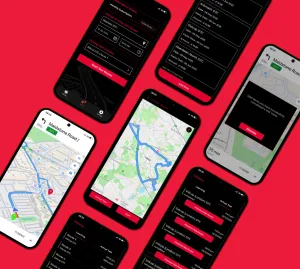
The interface is simple, with clear icons and navigation menus. On the home screen, you can see the list of available test routes, each corresponding to a specific area in the UK. You can select your preferred route and get started immediately. The app also includes helpful features such as real-time navigation and voice instructions to guide you through the routes.
Using the App to Prepare for Your UK Driving Test
Viewing Test Routes
Once the app is set up, you can start viewing the test routes. The app provides clear, easy-to-follow maps of each test route, showing you the key areas and junctions that you’ll encounter on your test. You can explore the routes in detail, taking note of tricky areas, sharp turns, or roundabouts.
Practising Routes
Practising the routes is where the app truly shines. The Test Routes Driver App offers detailed instructions and live guidance, so you can simulate the real test conditions. Whether you’re driving in a residential area, navigating roundabouts, or dealing with busy junctions, the app provides turn-by-turn directions just like a GPS system.
By regularly practising these routes, you’ll gain confidence and familiarity with the areas covered in the driving test. You’ll also get valuable tips on how to approach certain manoeuvres, such as parallel parking or reversing into a bay.
Key Features for Learners
- Roundabouts: The app highlights roundabouts and explains how to approach them correctly.
- Junctions: It gives detailed instructions for navigating complex junctions.
- Driving Tips: The app includes tips from experienced driving instructors to help you avoid common mistakes during the test.
Customising Your Experience in the Test Routes App
Personalisation Options
The Test Routes Driver App allows you to tailor the app to suit your learning style. You can select specific routes or areas you want to focus on, such as busy town centres or rural roads. This flexibility ensures you get the most out of your practice sessions.
Tracking Your Progress
The app also offers progress tracking, so you can see how far you’ve come. It monitors your performance during each route, showing you areas where you need improvement. You can track your success rate with each route and make adjustments as needed.
Benefits of Using the Test Routes Driver App
Convenience
One of the main advantages of using this uk driving test app is its convenience. You can practise driving routes at any time, without the need for a driving instructor or additional lessons. Whether you’re at home, in the car, or on the go, you can access the app and start practising whenever it suits you.
Real-time Updates
The app keeps you updated with real-time information on traffic conditions and any changes to test routes. This helps you stay informed about road closures, diversions, and other factors that could affect your driving test.
Save Money
By using the app to practise independently, you can reduce the number of driving lessons you need. This can lead to significant savings in the long run, allowing you to focus on areas where you need the most improvement.
Common Questions About the Test Routes Driver App
Is the app free to use?Yes, the app offers free access to a variety of routes and features. You can download driving test routes for free, although premium options are available for additional content and tools.
Can I use the app on my mobile?Absolutely! The app is designed to work seamlessly on mobile devices, making it easy to take your practice sessions with you wherever you go.
How accurate are the test routes in the app?The app uses real test routes from across the UK, ensuring that the routes you practise on are as accurate as possible. It also updates regularly to reflect any changes to the road network.
Conclusion
The Test Routes Driver App is an invaluable tool for any learner driver preparing for their UK driving test. With its user-friendly interface, accurate test routes, and customisable features, this app helps you focus on what matters most – passing your test. Whether you want to practise on your own or track your progress over time, the app offers everything you need to succeed. So, don’t wait – download the UK driving test app today and start preparing for success.
With Test Routes, you can trust that you’re using a reliable resource to prepare for your driving test.
