

Stair Calculator & Stair Stringer Calculator Guide. Use our Stair Calculator & Stair Stringer Calculator to design safe, perfect stairs. Quick, fun, and easy step-by-step guidance!
Master Your Steps: Stair Calculator & Stair Stringer Calculator
Building stairs can feel tricky, but with the Stair Calculator and Stair Stringer Calculator, it’s easier and even fun! These tools help you create safe, precise stairs without guesswork. Let’s dive into how they work and why every DIYer and builder should use them.
1. What is a Stair Calculator?
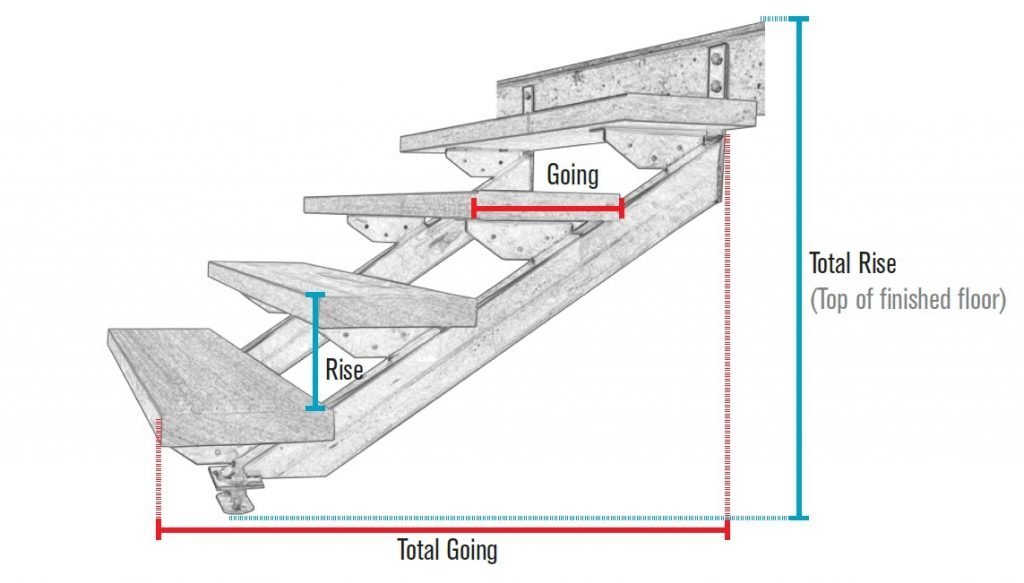
A Stair Calculator is a digital tool that helps you figure out the ideal number of steps, height of each riser, and length of each tread for your staircase. By inputting the total rise (floor-to-floor height) and run (horizontal length), the calculator gives exact measurements, making stair construction safe and precise.
2. Understanding the Stair Stringer Calculator
The Stair Stringer Calculator is a specialized tool for designing the wooden supports (stringers) that hold each step. It calculates the angles, cuts, and placement of each riser and tread so you don’t have to measure repeatedly. It’s a lifesaver for both beginners and professional carpenters.
3. Benefits of Using These Calculators
- Accuracy: No more trial-and-error when cutting wood.
- Safety: Proper rise and run prevent accidents.
- Time-saving: Quickly get measurements without manual calculations.
- Cost-effective: Reduces mistakes and wasted materials.
Using the Stair Calculator together with the Stair Stringer Calculator ensures your stairs are not only functional but also visually balanced.
4. Step-by-Step Guide to Using the Stair Calculator
- Measure the total height from floor to floor.
- Enter the total rise into the Stair Calculator.
- Specify the desired tread depth.
- The calculator provides the number of steps and riser height.
- Note down the measurements for stringer preparation.
This makes construction planning smooth and stress-free.
5. How to Use the Stair Stringer Calculator
- Input the riser height and tread depth from your Stair Calculator.
- Specify the length of your staircase run.
- The calculator provides stringer layout and cut angles.
- Transfer measurements to your wood and cut precisely.
Following this ensures every step is perfectly aligned and structurally strong.
6. Tips for Perfect Stairs
- Always double-check measurements.
- Consider adding non-slip treads for safety.
- Use quality wood for long-lasting stringers.
- Keep the calculator results handy while building.
7. What is a Stair Rise and Run Calculator?
A Stair Rise and Run Calculator is a digital tool that calculates the height (rise) of each step and the depth (run) of each tread. By inputting the total height from one floor to another, this calculator ensures your stairs are comfortable, safe, and compliant with building standards.
8. Why Use a Stair Calculator with Diagram?
A Stair Calculator with Diagram goes a step further—it not only provides measurements but also generates a visual representation of your staircase. This makes it easier to plan your layout, adjust proportions, and prevent errors during construction.
9. Benefits of Using Both Calculators
- Precision: Accurate riser and tread measurements.
- Visualization: See your stairs before building with diagrams.
- Safety: Proper dimensions reduce tripping hazards.
- Efficiency: Saves time and avoids costly mistakes.
- DIY-Friendly: Makes stair building fun and stress-free.
Using both tools together ensures a flawless staircase design from start to finish.
10. Step-by-Step Guide: Using the Stair Rise and Run Calculator
- Measure the total height from floor to floor.
- Enter this height into the Stair Rise and Run Calculator.
- Specify the number of steps or desired riser height.
- The calculator provides the perfect rise and run dimensions.
This sets the foundation for your staircase and ensures comfort with every step.
11. Step-by-Step Guide: Using the Stair Calculator with Diagram
- Input the riser height and tread depth from your Stair Rise and Run Calculator.
- Enter the staircase width and number of steps.
- Generate a detailed diagram showing each step’s position.
- Adjust as needed before starting construction.
Having a diagram reduces guesswork and makes installation smooth and accurate.
12. Tips for a Safe and Stylish Staircase
- Double-check all measurements before cutting or installation.
- Use quality materials for durability.
- Add anti-slip treads or finishes for safety.
- Keep your diagram handy on-site for reference.
Conclusion
A Stair Calculator and Stair Stringer Calculator are more than just tools—they’re your stair-building best friends! They save time, reduce errors, and help you create safe, beautiful stairs. Whether you’re a DIY enthusiast or a professional carpenter, these calculators make every project smoother and more enjoyable.
