VPN ads are everywhere. YouTubers promise they will make you invisible online, protect you from hackers and keep your data safe from everyone. With that much marketing, it is easy to feel unprotected without one.
But do you really need a VPN at home, on your own Wi-Fi, behind your own front door? The honest answer is: sometimes yes, often not as much as the ads suggest. This guide explains what a VPN really does, what it cannot do, and how to decide whether it is worth paying for.
What a VPN Actually Does
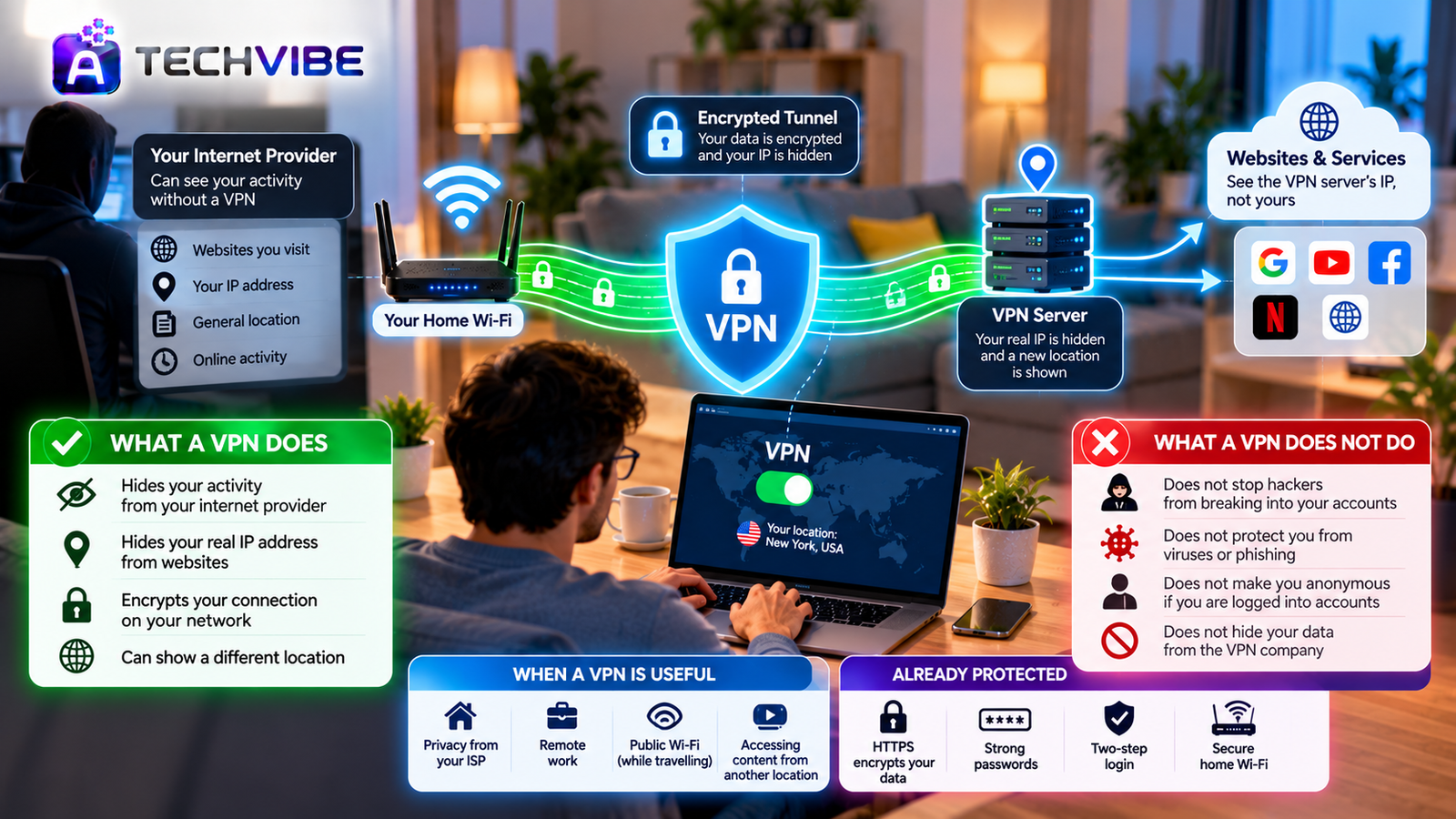
A VPN, or virtual private network, creates an encrypted tunnel between your device and a server run by the VPN company. Your internet traffic travels through that tunnel before reaching the website you visit.
This does three main things:
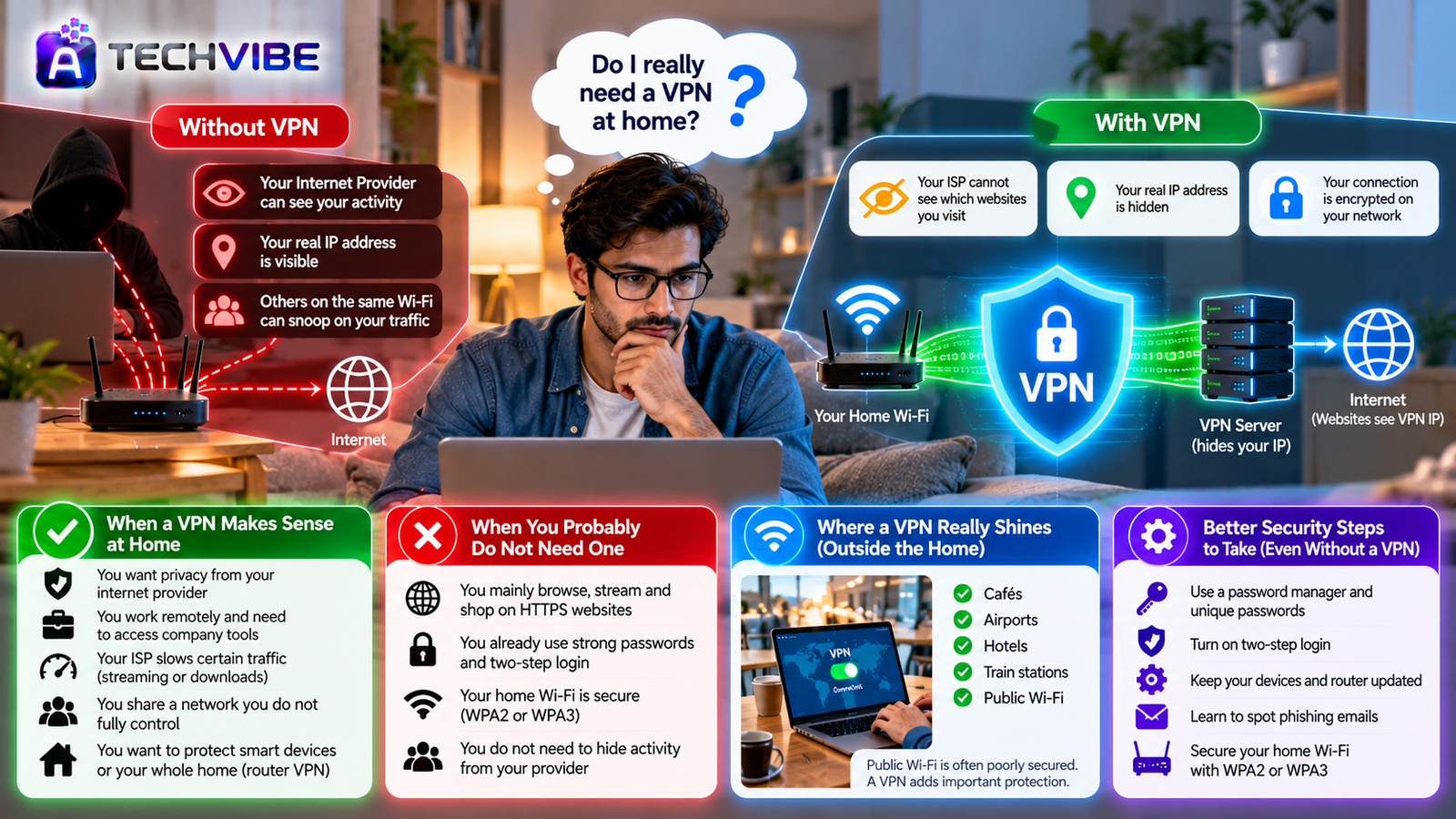
Hides your activity from your internet provider. Your provider can see that you are connected to a VPN, but not which websites you visit.
Hides your real IP address from websites. Sites see the VPN server’s address instead of yours, which also shows a different location.
Encrypts your connection on the local network. Anyone snooping on the same Wi-Fi cannot read your traffic.
That is useful. But it is also much narrower than many people believe.
What a VPN Does Not Do
This is where marketing and reality part ways.
It does not stop hackers from breaking into your accounts. Most account hacks happen through stolen or reused passwords, not by intercepting home internet traffic. Strong passwords and two-step login protect you far more, as we explain in why every business should use multi-factor authentication.
It does not protect you from viruses or phishing. If you click a fake login link or download a harmful file, a VPN will not stop it. For that, you need good habits and proper security software, a topic covered in the role of cybersecurity applications in detecting and preventing modern threats.
It does not make you anonymous. If you are logged into Google, Facebook or any account, those services still know exactly who you are. Cookies, browser fingerprinting and app tracking also continue to work.
It does not hide your data from the VPN company. You are shifting trust from your internet provider to the VPN provider. If that provider logs your activity or has weak security, you may be worse off.
Your Connection Is Already Mostly Encrypted
Here is something the ads rarely mention. Most websites today use HTTPS, shown by the padlock in your browser. HTTPS already encrypts the content of what you send and receive, such as passwords, messages and payment details.
So on a secure home network, a VPN mainly adds privacy about which sites you visit, not protection for what you do on them. For many people, that is a nice extra rather than a necessity.
When a VPN Makes Sense at Home
There are still good reasons to use one, even on your own Wi-Fi.
You want privacy from your internet provider. In some places, providers can collect browsing data. A VPN keeps that information away from them.
You work remotely. Many companies require a VPN to securely access internal tools and files. In that case, your employer usually provides it. With hybrid work now the norm, as we discuss in how technology is transforming modern workplaces, this is one of the most common uses.
Your internet provider slows certain traffic. Some providers limit speeds for streaming or large downloads. A VPN can sometimes prevent this because the provider cannot see what type of traffic you are using.
You share a network you do not fully control. In hostels, shared apartments or offices where many people use the same Wi-Fi, a VPN adds a useful layer of protection.
You want to protect smart devices or the whole home. Some routers can run a VPN for every connected device. This is helpful if you care about privacy across TVs, speakers and other gadgets. If your home is full of connected devices, our guide to choosing the best smart home gadgets explains which features matter for privacy.
When You Probably Do Not Need One
You can likely skip a paid VPN at home if:
You mainly browse, stream and shop on HTTPS websites.
You already use strong, unique passwords and two-step login.
Your home Wi-Fi is secured with a strong password and WPA2 or WPA3 encryption.
You do not need to hide activity from your provider or access a work network.
In these cases, your money is better spent on a password manager or upgrading an old router.
Where a VPN Really Shines: Outside the Home
Ironically, VPNs are most useful away from home. Public Wi-Fi in cafés, airports, hotels and train stations is often poorly secured. Attackers can set up fake networks with names like “Free Airport WiFi” to watch traffic.
If you often work on the go, having a VPN on your phone and laptop is a smart precaution. Phones now handle more of our work and personal life than ever, as covered in how AI smartphones are changing everyday mobile use, so protecting mobile connections matters.
The Downsides to Know About
Slower speeds. Routing traffic through another server adds distance. Good VPNs keep the slowdown small, but it is rarely zero.
Monthly cost. Quality VPNs charge a subscription, usually cheaper with longer plans.
Blocked services. Some banks, streaming platforms and websites block or challenge VPN connections.
Free VPN risks. Running servers costs money. Many free VPNs make up for it by showing ads, limiting data or, in the worst cases, collecting and selling user information.
Local rules. VPN laws differ between countries. Some places restrict VPN use or require providers to keep user records. Check the rules where you live before choosing a service.
How to Choose a Trustworthy VPN
If you decide a VPN is right for you, look for these features:
A no-logs policy that has been independently audited, not just promised.
Modern protocols such as WireGuard for speed and strong security.
A kill switch that blocks internet traffic if the VPN connection drops.
Apps for all your devices, including phones, laptops and routers.
Clear ownership and jurisdiction, so you know who runs the service and which laws apply.
Transparent pricing with a money-back guarantee you can test.
Avoid any provider that makes unrealistic promises like “100 percent anonymity” or “total protection from hackers.”
Better Security Steps to Take First
If your goal is to stay safe online, these steps matter more than a VPN:
Use a password manager and unique passwords for every account.
Turn on two-step login, especially for email, banking and cloud storage.
Keep your phone, computer and router updated.
Change your router’s default admin password and use WPA3 or WPA2 encryption.
Learn to spot phishing emails and fake login pages.
Automation is also helping people and businesses catch threats earlier. Learn how in security automation’s impact on cybersecurity teams.
So, Should You Get One?
A VPN is a useful privacy tool, not a magic shield. At home, it mainly hides your browsing from your internet provider and changes your visible location. It does not stop hacks, malware or tracking by the sites you log into.
Get one if you value privacy from your provider, work remotely, use public Wi-Fi often or want an extra layer across your devices. Skip it, or at least do not rush, if your main goal is security. Strong passwords, two-step login and regular updates will protect you far more.
For more straightforward answers to everyday tech questions, explore the latest guides on AtechVibe.